

Which POS software for a campground?
StillDeep Camping: the site map, bookings at the desk and online, seasonal rates at the best price, the camp store, the nightclub and guest accounts, on one engine. Built in Quebec, Canada: GST, QST and HST in the engine, French and English throughout. Try it in your browser, then make it your own. Modules: Sites and seats, Retail, Bars and restaurants and Loyalty cards.
An example to make your own
StillDeep Camping shows one way to run a campground on StillDeep; there are others. Its screens run for real on the same engine: a site is rented only once for a given night, whatever the screen, and every purchase a guest makes, at the front desk, the camp store, the nightclub or on the website, lands on the same account.
The interface is a starting point. With the source code, make it yours: the map of your grounds, your zones and services, your colors, each option where your staff and your guests look for it. The engine keeps the rules: taxes, nights, accounts and cards stay right.
The front desk, the camp store and the nightclub are small Windows applications in WPF; their web version in Blazor runs in a Windows-like desktop, with a staff app made for the phone, in portrait. Try them live: it is the example itself, on its own server. Demo employees use the password stilldeep123; no card is charged.
What the example supports
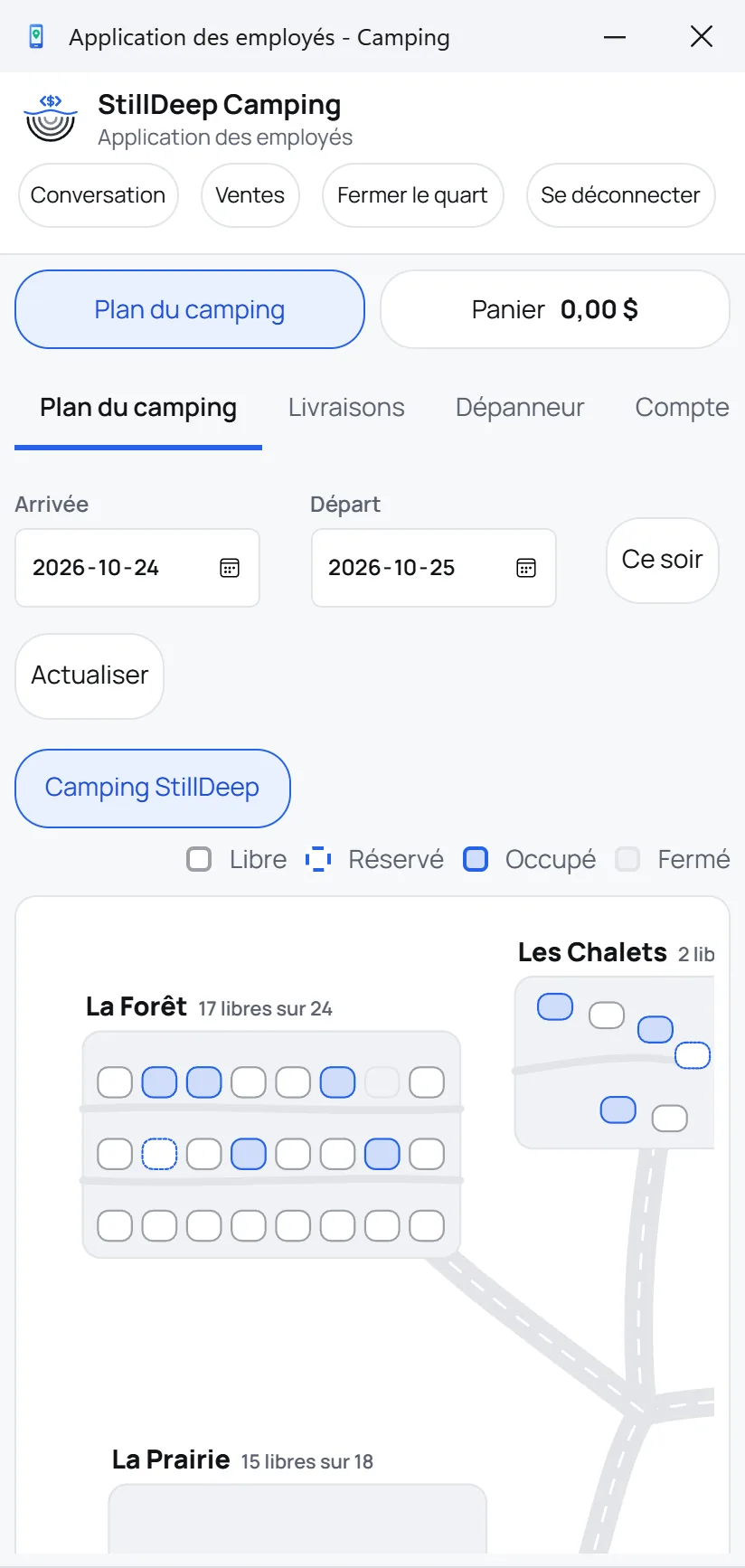
- Campground map. The campground, its zones, then each site on the map of its zone: free, booked, occupied or closed for the chosen dates.
- Bookings. Sites and cabins by the night, with the party size, never more than the site's capacity; the main hall by the hour; free sports courts by the hour, for guests whose stay covers the whole slot. Nights are held as soon as they go into a cart: two registers, or the register and the website, never sell the same night.
- Arrivals and departures. Check-in, check-out, extension, move to another site before or after arrival. An extension over nights already taken is refused cleanly, with nothing undone. At departure, an unpaid account triggers an alarm: only the manager lets the guest leave.
- Camp store. Groceries, firewood, camping basics, bulk candy by the kilo; paid on the spot, charged to the guest or to the site, or delivered to the site.
- Nightclub. Night entry or guest entry, age checked once per sale, coat check and bar, all on the guest's account.
- Guest accounts. One spending account per customer, with its limit, settled at the counter or online; children's purchases on the parent's account; a payment basket that settles several invoices at once.
- Camping card. A prepaid card sold and topped up at the front desk, the camp store and on the website, even during the stay; shared with the family, it never goes past its balance, is used up before the account is charged and is refundable.
What the engine handles for your stays
Under the example, the Sites and seats module does the work the screen does not have to redo: prices, nights and rules stay right, whatever screen makes the sale.
The best price, worked out for you
Each site has its rate grid. For the requested dates, the engine finds the exact combination that costs least: 2 weekend nights and 3 weeknights, or a weekly package cheaper than 7 nights.
Peak season, low season, weekends
A rate applies between two dates, on chosen nights of the week: the weekend is Friday and Saturday night, arriving Friday, leaving Sunday.
By the hour, the night, the month or the year
A rate lasts minutes, days, months or years. A month follows the calendar: 30 or 31 days, and February.
Seasonal sites stay seasonal
A site with only a monthly rate cannot be rented for less than a month: the minimum stay comes from the grid, with no extra rule.
A price no one can force
The server recomputes and checks the price of every stay: neither a register nor the website can impose a fake price.
Nights sold only once
Held as soon as they go into a cart, for 15 minutes on the website during payment, then released if the order is not paid.
The front desk
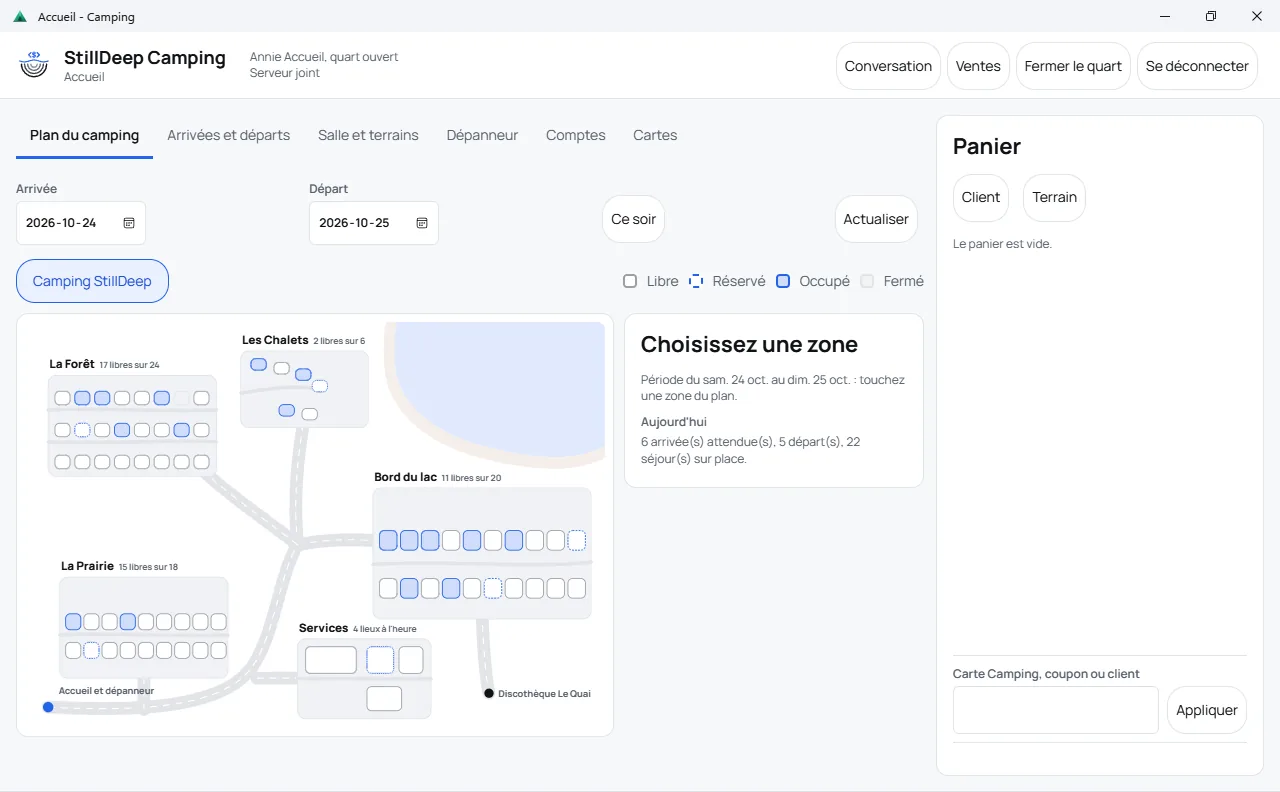
Pick the dates: the campground map shows each zone and what is still free in it. Touch a zone, then a site: its services, its capacity, its check-in and check-out times, its price for the stay and the guests already there.
Arrivals, departures, extensions and moves happen from the same screen, with the guest's account alongside.
The camp store
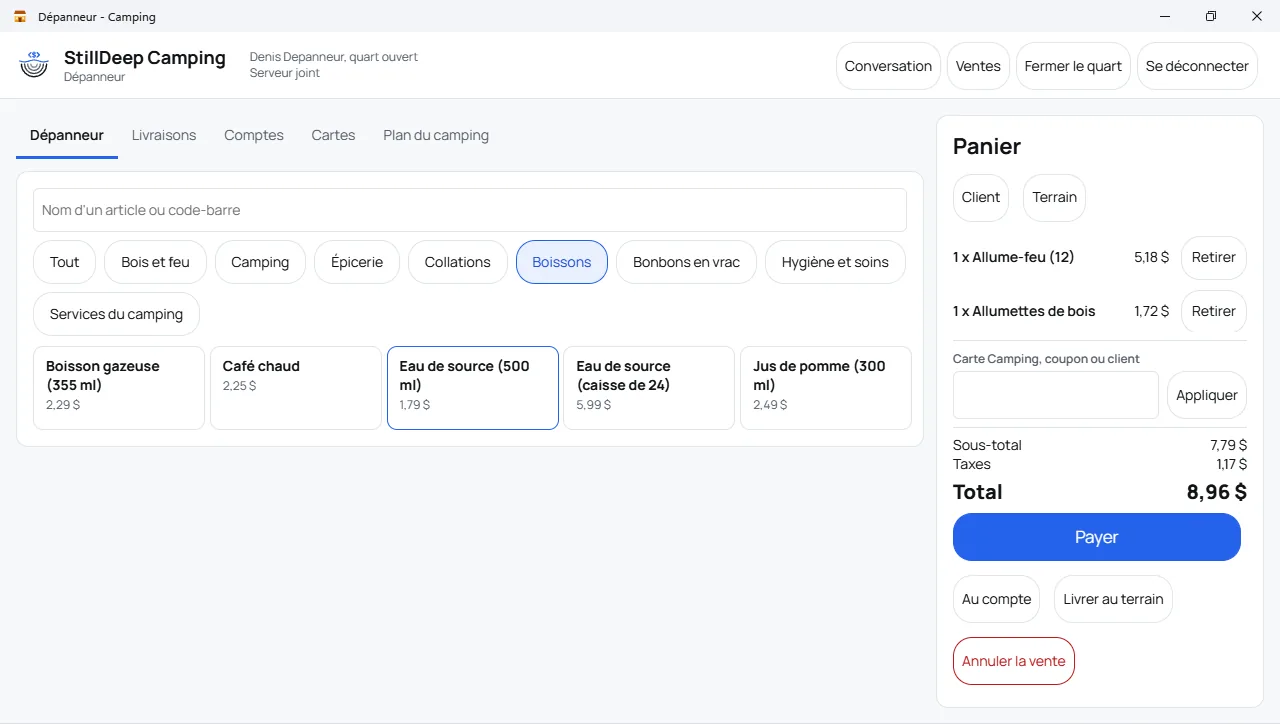
Firewood, groceries, drinks, bulk candy weighed by the kilo: large tiles by category. The cart is paid on the spot, charged to the guest or to the site, or sent for delivery to the site.
The nightclub
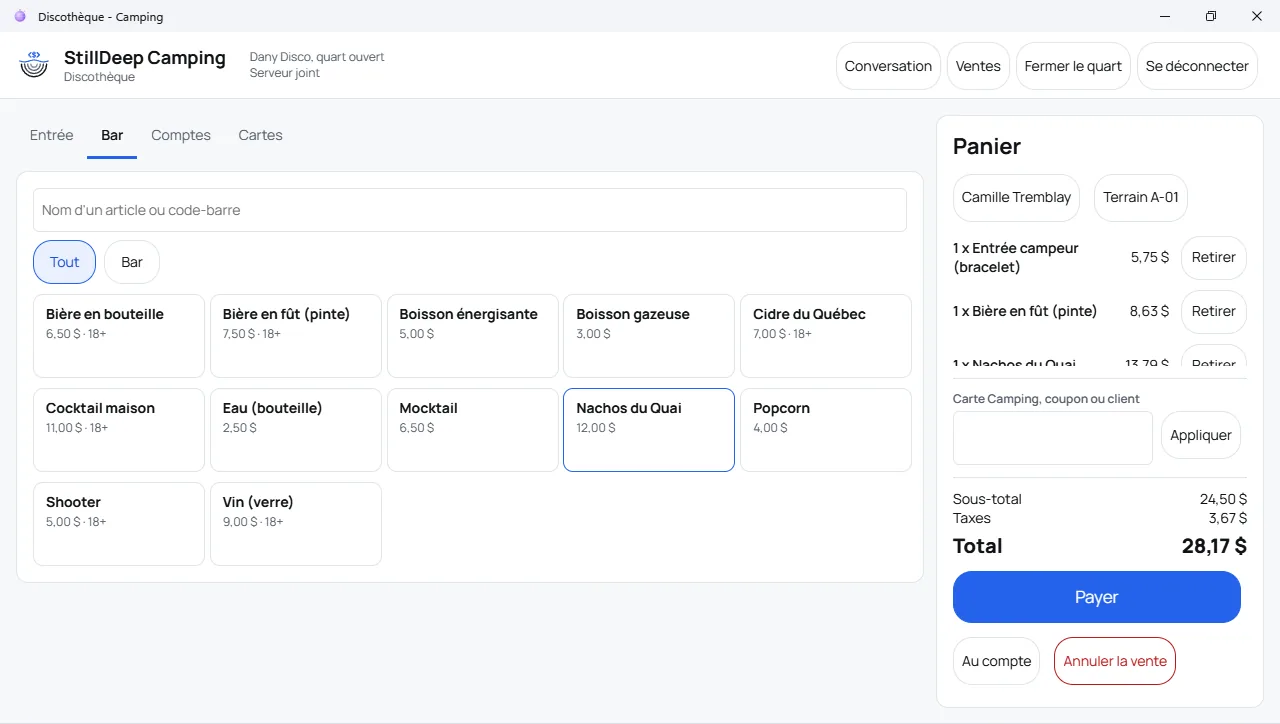
At the door, the count of people inside and the guest entry, cheaper for anyone with a current stay. At the bar, beer, cider, cocktails and snacks: age is checked once per sale, and the night goes on the guest's account.
Online booking
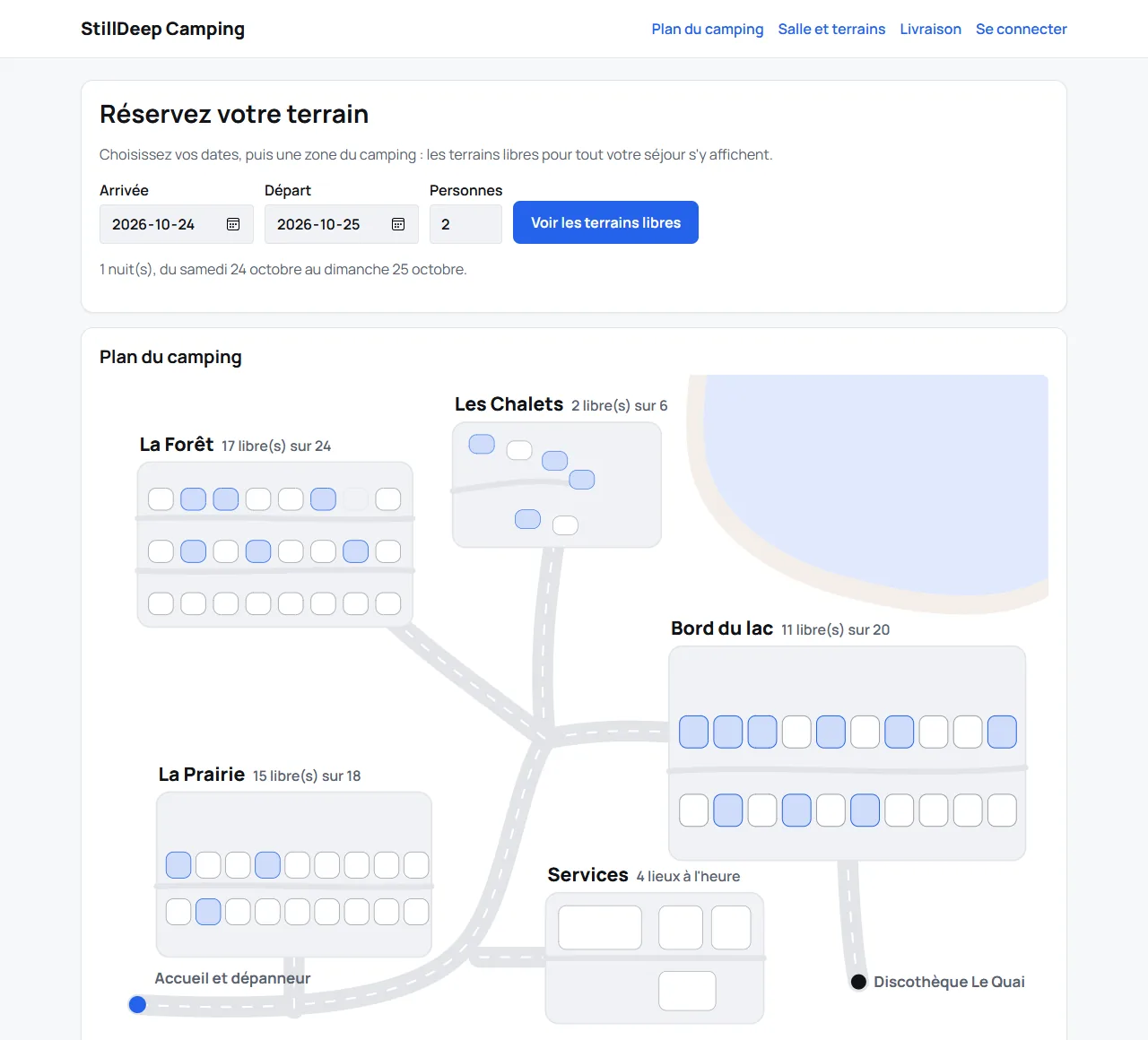
The guest picks the dates and a zone: only sites free for the whole stay can be booked. The nights are held for 15 minutes while paying, then released if the order is not paid. Meanwhile, no register can sell them.
Once on site, the guest books the hall or a court, tops up the camping card, settles the account and orders firewood or groceries, delivered to the site, tip included. The web pages need no script.
Try it live (in French): demo guests [email protected] to [email protected], password stilldeep123. Test mode, no card is charged.
The staff app
On the phone, in portrait: the campground map, the deliveries to make, the camp store and the accounts. The employee delivers to the site and takes cash, or puts the delivery on the guest's account.
Every screen of the example switches to portrait under 820 pixels wide: the view or the cart, one touch apart.
How it runs
One server for the whole campground
The campground's server keeps the database, the Admin and the Reports: zones, sites, their map, their prices and their occupancy calendar.
Every screen on the same sites
Front desk, camp store, nightclub and staff app are registers, and so is the booking website. A site is rented only once for a night, whatever the screen.
The screens are yours
Each screen is a small application of its own. Change its map, its images, its colors and where its options sit without touching the engine: taxes, nights and accounts stay right.
Free screen source code
The source code of the front desk, the camp store, the nightclub, the staff app and the booking website is free: copy it, put your brand on it, make it your own campground.
Five complete screens
Front desk, camp store and nightclub in WPF and in Blazor in a web desktop, a staff app in portrait, a booking website in Blazor without script.
A map drawn by the screen
Zone outlines, the lake, the paths and the place of each site are attributes of the locations: the screen draws the map, the engine says what is free.
Ready for your coding agent
Each example comes with its AGENTS.md, and the stilldeep-pos-screen skill gives a coding agent the steps to adapt the screens to your business. Describe what you want: the agent changes the screens, the engine keeps the rules.
The developer guide shows the other way: your own screen, in your language.
Its modules
- Sites and seats Campsites, stays, seasonal rates and seats
- Retail Stock, barcodes, weights and labels
- Bars and restaurants At the counter or at the table
- Loyalty cards Customer cards, season passes and coupons
January 2027. Prices and online purchase for these modules open on that date. Create your account today: it will be ready.
Questions about the campground example
Does StillDeep suit a campground in Quebec?
Yes. It handles sites and cabins by the night, seasonal rates, the camp store and guest accounts, with GST and QST, in French and English.
Is it finished software?
It is an example: it works as is, and it is made to be changed. Keep what serves you, change the rest, or write your own screens on the same engine.
Do I need all four modules?
No. Sites and seats rents the sites and the hall, and prices them; add Retail for the camp store, Bars and restaurants for the nightclub, and Loyalty cards for the camping card. Take only the modules you need.
How is the price of a stay computed?
From the site's rate grid: weeknight, weekend night, week, month, each for its season. The engine takes the cheapest combination that covers the dates exactly, and the server checks it at every sale.
Can two registers sell the same site?
No. A night is held as soon as it goes into a cart, at the front desk as on the website. The second register sees the site taken: the guest picks another site or other dates.
Can I rent out bikes, kayaks or parking?
Yes, with the Rental module: a grid by duration, a daily cap, a deposit and an agreement. It works alongside the other four.
Can I draw the map of my campground?
Yes. Each zone and each site carries its drawing in their attributes: the zone's outline on the campground map, the site's place on the map of its zone. The example's demo data sets them for five zones; change them, the screen follows.
Does it run on Linux or a Mac?
The campground's server runs on Windows, Linux and macOS. The three WPF registers are Windows only; their web version in Blazor and the booking website run on any server and open in any browser, phones included.
Is the web demo real?
Yes. The booking website and every window of the web desktop are real registers of the example, on its own server and its own database. Card payment is in test mode: nothing is charged.
Is the campground example free?
Yes. The screen source code is free. Modules are rented per register; developers, schools and nonprofits can apply to the free program.